p3n, wherever you write

Find the AI in any text, then rewrite it, right in the app you're writing in: your browser, Word and Excel, and soon Google Docs.

Free for 10 checks or rewrites an hour. No account needed.

Your text95% AI

Ultimately, this seamless transition unlocks a rich tapestry of possibilities for teams of all sizes, empowering everyone to thrive in an ever-evolving landscape.

p3n's rewrite1% AI

This transition helps teams of all sizes.

A real rewrite by p3n: the filler goes, the fact stays.

Pick the app you write in

Each one checks the text you select, shows the sentences that give it away, and rewrites it in place.

Chrome, Edge and Brave

Select text on any page, right-click and pick p3n, then Check for AI. The score, the reasons and a rewrite open in the side panel, and Replace puts the rewrite where your text was.

From the Chrome Web Store. Edge and Brave install it from there too.

Firefox

In review, coming soon. The same extension, in Firefox's sidebar, for Firefox 140 or later.
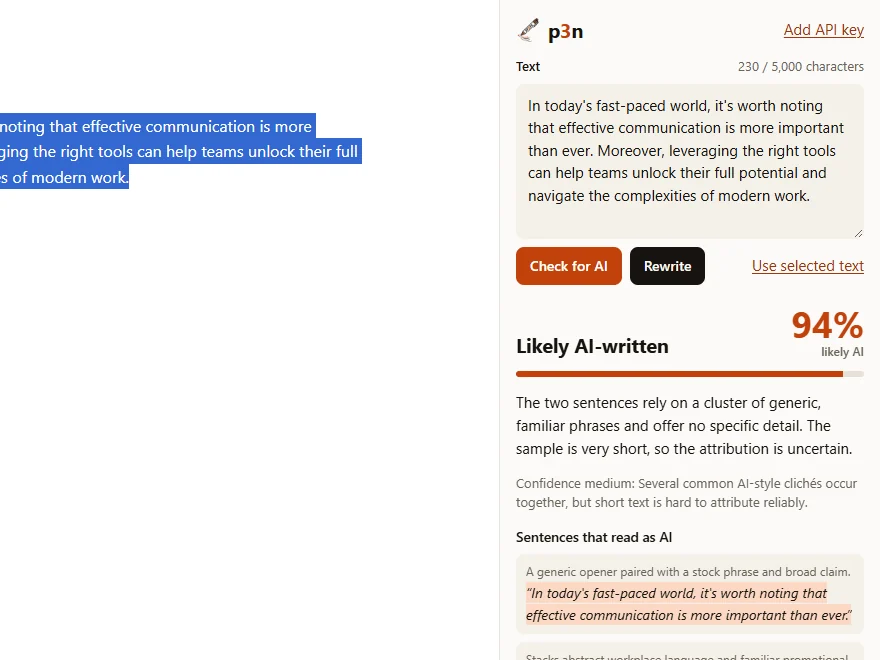
p3n's side panel in Chrome next to a blog post: Likely AI-written, 94%, with the two sentences that read as AI.

Word and Excel

Select text in Word, or cells in Excel, and click Check for AI on the Home tab. Replace puts the rewrite back with each paragraph's style, and Ctrl+Z undoes it.

p3n isn't in Microsoft's add-in store yet, so you add it once from this file. It loads from the web after that, so it updates by itself.

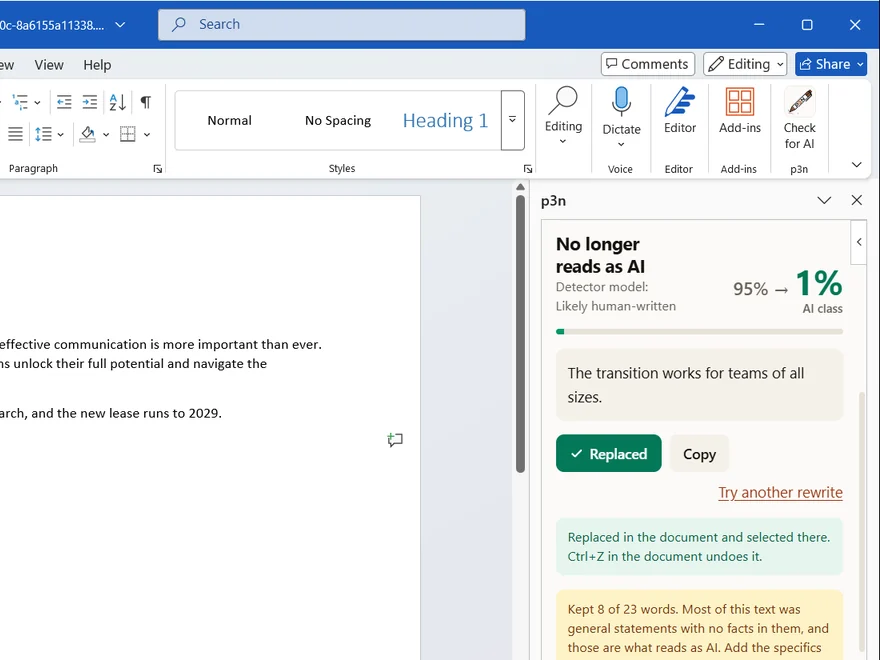
p3n in Word: the Check for AI button on the Home tab, and the p3n pane after a rewrite, No longer reads as AI, 95% to 1%, with the rewrite replaced in the document.
On the web
Open a document, then Home › Add-ins › More Settings › Upload My Add-in, and upload the file. This browser keeps it. Microsoft's steps
Windows
Share a folder and put the file in it. In Word or Excel, add the folder's network path under File › Options › Trust Center › Trust Center Settings › Trusted Add-in Catalogs, tick Show in Menu and restart. Then Home › Add-ins › Advanced › Shared Folder › p3n. Microsoft's steps
Mac
Copy the file to ~/Library/Containers/com.microsoft.Word/Data/Documents/wef (for Excel, com.microsoft.Excel; make the wef folder if it's missing). Restart the app, then Home › Add-ins › p3n. Microsoft's steps

Google Docs

Select text in a doc and open Extensions › p3n. Check and rewrite in the sidebar; Replace selection keeps headings, lists and formatting, and one Ctrl+Z undoes it.

Coming soon. The add-on is in Google's review for the Workspace Marketplace.

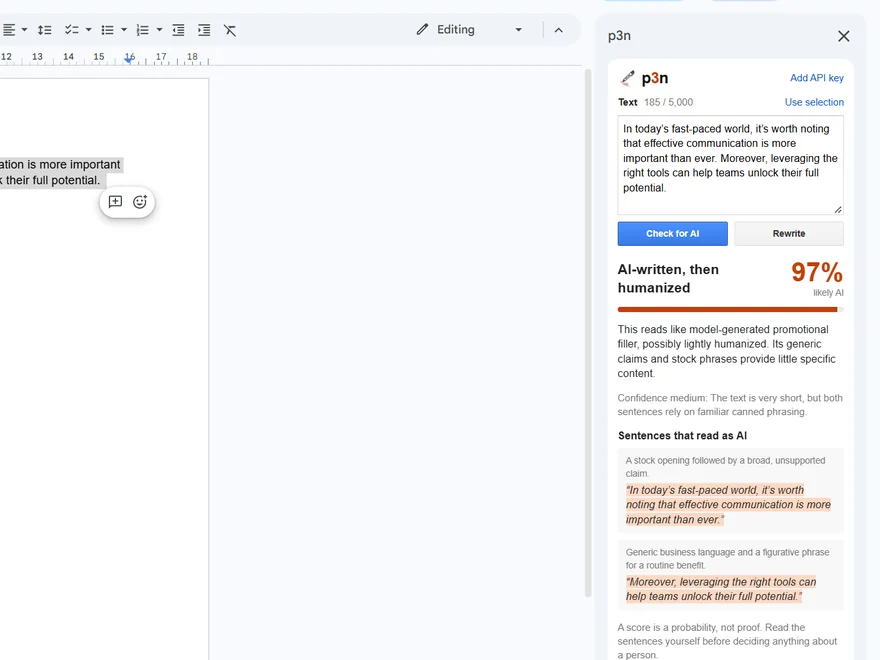
The p3n sidebar in Google Docs: AI-written, then humanized, 97% likely AI, with the sentences that read as AI.

Your text goes to api.p3n.si only when you click. No history, no analytics.

Free to start

10 checks or rewrites an hour without an account, up to 5,000 characters each. For more, make an API key at p3n.si and paste it into the app.

Open source

Every app is MIT-licensed on GitHub: the browser extension, the Word and Excel add-in and the Google Docs add-on.